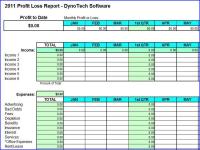
Award-winning Excel spreadsheet is a simple alternative to accounting software for a small business to track income and expenses. Easier for you and tax preparer when tax time rolls around. Save time, money and tax time headaches. Requires MS Excel.
Looking for a better way to keep track of your small business income and expenses? Are you sending too much of your hard-earned money to the IRS each year because you are not taking all of your qualified deductions?
This award-winning Excel spreadsheet, created by DynoTech, is a simple alternative to accounting software for a small business to organize and track income and expenses. Make it easier for you or your tax preparer to fill out tax forms when tax time rolls around. For those in USA, expenses are organized to support Schedule C (self-employed tax form).
For Small Business, Home Business, Self Employed.
If you've outgrown the shoebox organization method, but aren't quite ready for full-blown accounting software, this spreadsheet is for you!
Designed to save you time and money. And, YES, it may even help prevent those Tax Time Headaches.
1. Enter data. No complicated setup to customize your report. Be ready in a few minutes.
2. Enter income and expenses. Easily organize income and expenses for business management and tax preparation.
3. Review report. One-page summary saves you time and increase accuracy. All totals automatically calculated for you.
Quick and Easy Navigation. Select main report, data entry page, specific month or loan calculator by clicking on a tab. No complicated navigation required. Includes pop-up calendar for date entries. Click a button to insert additional rows for monthy entry pages. And, much more. Everything is quick and easy.
Demo allows limited entries, but still lets you evaluate all functions. Full version allows you to edit formulas and pages as desired.
NOTE. Requires MS Excel 2000 or higher. Macros may not be compatible with Open Office Suite or MAC computers. Works with Windows 7 and MS Office 2010. Whats new in version 5.0: Now you can add up to six income sources (instead of just one). Verified Windows 7 compatibility. Requirements: MS Excel 2000 or higher, including Office 2010. Macros not compatible with Open Office Suite or MAC. Operating system: Win7 x32,Win7 x64,WinVista,WinVista x64,WinXP Release notes: Minor Update
Tired of trying to figure out how to work around "features" in the heavily advertised microcomputer accounting packages? If you have a small professional office you can save a lot of time and frustration by using General Ledger III
Price: $30.00, Rating: 9, Downloads: 124 Download
The bookkeeping+warehouse program - cash department, bank, the personnel, calculation of salaries the plan of accounts, a turn under accounts (with an opportunity filtering, sorting, etc.), balance, invoice, waybills.
Price: $189.00, Rating: 10, Downloads: 123 Download
Controls up to 64 SELLmatix POS Terminals in Retail Stores and Restaurants automatically updating masterfiles and retrieving transactions. Provides inventory and customer maintenance, prints barcodes, shelf labels, clerk cards, customer cards etc.
Price: $, Rating: 5, Downloads: 117 Download
Calculate US, Canadian and foreign loans. Very intuitive. Does late payments, lumpsum payments, changed payments, interest changes, etc. Use 360-day and Exact day factor methods. Crush your US or Cdn mortgage sooner and save on cumulative interest.
Price: $27.00, Rating: 10, Downloads: 112 Download
User Rating
Rating:2.2 out of
5 Based on13 ratings.
13 user reviews.

 Profit Loss Report Spreadsheet 5.0 details